

Razer Laptop Cooling Pad: Adaptive Smart – Intelligent Fan Control – Airtight Pressure Chamber – Fits Most Laptops & Macbooks 14” to 18″ – Preset & Custom Fan Curves – 3 Port USB Type A – Chroma RGB
Original price was: $169.99.$149.99Current price is: $149.99.





Price: $169.99 - $149.99
(as of Mar 26, 2026 13:56:22 UTC – Details)
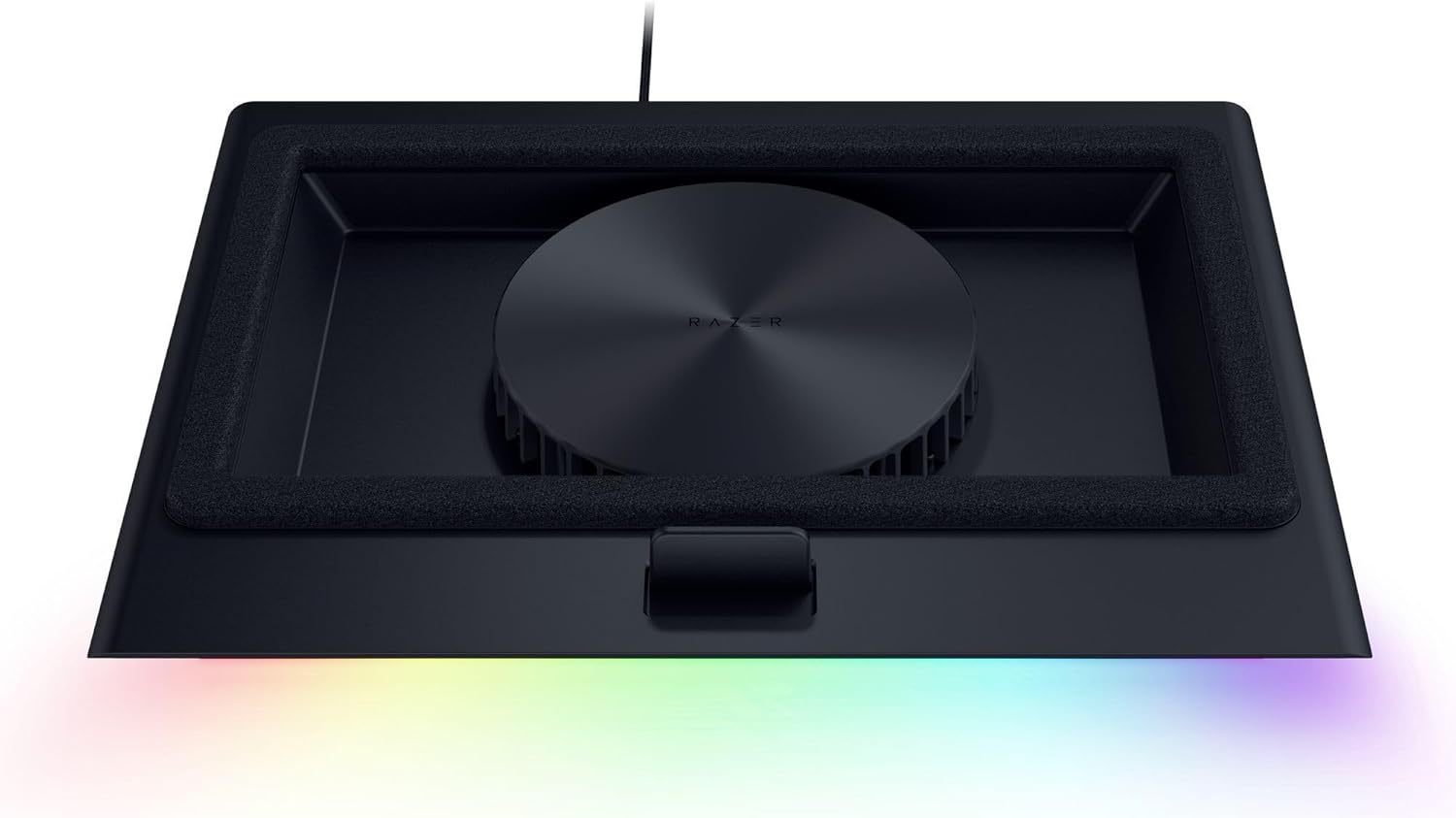
Stay cool when things heat up with the Razer Laptop Cooling Pad – a smart stand that dynamically controls fan speeds based on your laptop’s temperature. Featuring an airtight pressure chamber, customizable fan curves, and a 3-port USB A hub for maximum connectivity, give your laptop the boost it needs to run at its best.
SMART COOLING — From idle to full load, keep the laptop running smoothly with our first laptop cooling pad that changes fan speeds automatically to manage system temperatures based on the settings
AIRTIGHT PRESSURE CHAMBER — Included foam seals ensure no cool air leakage and works in tandem with a long lifespan 140 mm brushless fan that spins up to 3000 RPM to significantly reduce CPU, GPU, and surface temperatures
WORKS WITH MOST LAPTOPS — Whether you’ve got an ultra-portable 14″ laptop or an 18″ powerhouse, choose between three magnetic frames that maximize cool air pressure and circulation
PRESET & CUSTOM FAN CURVES — Keep the system cool in any scenario with our recommended presets or calibrate the fan to adjust for noise level or desired internal temperature via Razer Synapse
3-PORT USB TYPE A HUB — From webcams to controllers to drawing tablets, plug in more devices to the laptop without solely relying on its native USB ports
REMAPPABLE MULTI-FUNCTION BUTTONS — Make on-the-fly changes to the fan speed and Razer Chroma RGB lighting, or remap the button to adjust volume, launch apps, and more via Razer Synapse
2 YEAR MANUFACTURER WARRANTY — Have confidence in owning the Razer Cooling Pad with up to 2 years of warranty from Razer
RAZER HYPERBOOST — Takes full advantage of the Razer Laptop Cooling Pad’s smart cooling capabilities to maximize the performance of compatible Blades by improving thermal performance that allows key laptop components to sustain higher power limits
11 reviews for Razer Laptop Cooling Pad: Adaptive Smart – Intelligent Fan Control – Airtight Pressure Chamber – Fits Most Laptops & Macbooks 14” to 18″ – Preset & Custom Fan Curves – 3 Port USB Type A – Chroma RGB
Add a review
Related Products


Original price was: $169.99.$149.99Current price is: $149.99.
Jered Martin –
Worthwhile unless you need it for travel.
This has been amazing, not only does it actually as a cooler it also gives my laptop a lift so Im not staring down all day it also has a USB hub so I can connect my devices cleanly. Runs in different modes depending on your needs from quiet to hyper cooling (quite loud) and you can change the light settings or turn them off completely. Seems a little flimsy at first but it has been holding up well. It is a little bulky so transporting it frequently would be a hassle.
Kevin A. Oneill –
Excellent cooling – but not quiet
I’ve had this for 5 months now. I’ve always read that laptop coolers like these are a waste of money, and having proper airflow is all you need.I’m a developer. I have multiple node servers running at any given moment. I use nomachine and parsec to remote into my servers and other computers and keep those windows open throughout the day. along with my heavy daily workload, im also an active gamer and play everything from world of warcraft to escape from tarkov.I’ve been running tests the last few days of different workloads and my temps with and without the cooler. Without a cooler was always on a flat surface so it could breath. The laptop is a Scar 18 with 14900hk, 64gb RAM, and a 4090. It’s beefy, and this particular model has excellent cooling, which is a reason its so expensive.Without the cooling pad, My gpu temps would max out at roughly 87 degrees Celsius. WITH the cooling, i never hit 70. I actually never went above 66 degrees for any of my workflows. a reproducible 20+ degree difference is definitely beyond the “placebo” range and into desktop cooling levels. It’s not quiet, especially at full speed, but i didnt dock a star because we’re buying a laptop cooler. If you have a laptop and expect it and the cooler to be silent, you’ll never be happy.Overall, im surprised by the performance, and I really think this will help extend the life of my laptop.
Howie –
Great cooling pad
Very happy with this cooling pad. I’m using a laptop to run a golf simulator and it does a great job at keeping the CPU and GPU cooler to prevent throttling and avoid stuttering. I would estimate 10°c to 15°c cooler. Great software too for controlling the fan and the LED lights along the front of the pad. It displays temp, clock speed and other data for each processor. You can have app specific fan settings (profiles) that activate when a program is opened. That allows low fan speed automatically when not running demanding programs. It is a very stable platform for the laptop.
Yelyzaveta –
Great cooling performance for gaming
This cooling pad actually makes a noticeable difference while gaming. My laptop stays cooler under heavy load, and performance feels more stable. The build quality is solid, and the RGB lighting looks clean without being too much. The fan is powerful but not overly loud. If you use a gaming laptop, this is definitely worth it.
Andrey Dravinski –
Solid Cooling stand/pad with a few Caveats
Overall, this is a well made cooling stand that offers quite a few bells and whistles for what is ostensibly a fan in a plastic stand.Pros- Extremely powerful fan/airflow, I noticed a solid 10+ Celsius temperature reduction on my Asus TUF 16 with a 4070 TI and Ryzen processor when I had the cooling stand at medium fan speed- Stand lifts the laptop several inches off the ground, ensuring good airflow intake and reduced dust intake- Customizable inserts allow you to use a variety of laptop options and sizes, even those that don’t have intake vents on the bottom can still be cooled using the “Frame C” insert without the sealing sponge.- Built in USB hub with three ports simplifies plugging in keyboards/mice quite nicely- Manual power and fan speed buttons are easy to access on the side of the pad and the speed indicators are nicely visible in the front of the stand using a series of Green Bar lights indicating the current fan speed- Power passthrough intelligently shuts off the cooling pad when you power off your laptop without having to manually shut the power off or turn it back on when you power the laptop back on.- RGB is surprisingly muted on this stand, giving a nice glow near the front of the stand without being too ostentatious- Removeable/serviceable fan filterCons- Allegedly this stand claims to have “Dynamic Fan Control” via Razer’s “Synapse” software, however i could not figure out how to make this work. I installed the Synapse software on my Windows 11 laptop but it did not detect this stand at all, even after rebooting it. I’m not sure if it’s sending a background signal using the CPU’s power/temperature sensor to adjust the fan speed, but I couldn’t see that happening during my gameplay sessions. I had to rely on manual fan control to adjust the fan speed using the external buttons on the side of the stand- Probably the biggest black mark and reason for removing the star. While this laptop stand absolutely does a bang up job on cooling, this thing is LOUD. I’m sure most folks who have powerful laptops that need this kind of additional cooling will already be using headphones to game and content create, so it shouldn’t affect them too much, but it cannot be overstated just how loud this thing is, even on medium speeds. The low speed fan noise isn’t too bad, you kind of hear it like a low hum in the background, but moving the speed up to medium when I switched from working to gaming really kicked up the noise levels and made me appreciative of my headphones.If you have a significant other or roommate sharing the same space as this thing, it will annoy them as the blower noise is extremely present at medium speeds and higher. It has the same hum/fan noise as a microwave, that would be the best allegory I could assign to it.I couldn’t even imagine running this on high speeds without really good headphones or being in your own room with a door shut as the noise absolutely carries across my apartment on max speeds.- Lack of USB C ports. This is more of a smaller complaint, but the with the proliferation of USB-C type peripherals, including fancier keyboards and other devices, limiting the built in powered hub to only 3 USB Type-A ports does kind of detract from the USB hub functionality from this stand, if only from a “future proof” standpointOverall I’m very happy with the purchase here. It is a noisy cooling stand yes, but the ease of setup, customizability, and temperature benefits I can see with my laptop, this stand is worth the investment.
Charles Butler –
Not a great value but still a pretty good product.
It is pretty cool that my Razer laptop recognizes this cooling pad and unlocks a higher level of performance because it knows that it has additional cooling capacity. The Razer Synapse app is hit or miss depending on your system up-time but the extra USB ports, Razer Chroma compatibility, and the factory approved overclocking are a definite perk. With all that being said, I don’t know that it is worth the money. You can find quieter cooling pads that move more air and still have the USB hub built-in for almost 75% less but you lose out on the Razer Synapse settings control, Chroma compatibility, and factory overclock option. It really all depends on your priorities and preferences. If you are focused on value and functionality, look elsewhere. If you like to have matching peripherals that you can control from the same program/ecosystem and want to add to your sticker green sticker collection, then this is what you want.
J. Corona –
It is worth the investment. Great product with a lot of features and high quality materials. It connects to your laptop or pc and with the Razer you can actually see the internal temperature of your rpocessor. You can choose between quiet, balanced, and high performance mode. It comes with different apps if you choose to install, they are related to gaming forums, store, community creations, and more. Highly recommended product.
Cheryl –
Didn’t get Australian plug with this.
Ahmed Fawzi –
“I’m extremely impressed with the Razer laptop cooling solution! It’s sleek, well-designed, and highly effective at keeping my laptop cool during intense gaming or heavy workloads. The build quality is outstanding, and the cooling performance has noticeably improved my laptop’s efficiency and comfort. Highly recommend this for anyone looking to protect their device and enhance performance!”
Hector Olvera García –
Excelente producto, muy buena calidad el ecosistema de razer es increíble.
timeout187 –
I got the Razer Laptop Cooling Pad: Adaptive Smart, and honestly, it’s one of the best cooling pads out there. The intelligent fan control and airtight pressure chamber make a huge difference, keeping my laptop much cooler even under heavy loads. The preset & custom fan curves are a great feature, allowing for precise cooling adjustments. Plus, the RGB lighting adds that classic Razer touch.That said, I did have to pay import fees, which bumped the price to $250, making it quite expensive. But considering the build quality, performance, and extra USB ports, I’d say it’s still worth the investment if you need serious cooling. If you’re a gamer, content creator, or heavy laptop user, this cooling pad does the job perfectly!