

FIFINE AmpliGame Stream Controller with 15 Macro Keys, Streaming Keyboard with Trigger Actions in OBS/Twitch/YouTube/Streamlabs, Shortcut Buttons Keypad Works with Mac and PC-D6
$64.99


Price: $64.99
(as of Mar 21, 2026 14:49:04 UTC – Details)
Product description


The video showcases the product in use.The video guides you through product setup.The video compares multiple products.The video shows the product being unpacked. D6 guide video Merchant Video


1 One-click Operation
2 Wide App Support
3 Grow your Content
4 Vibrant RGB

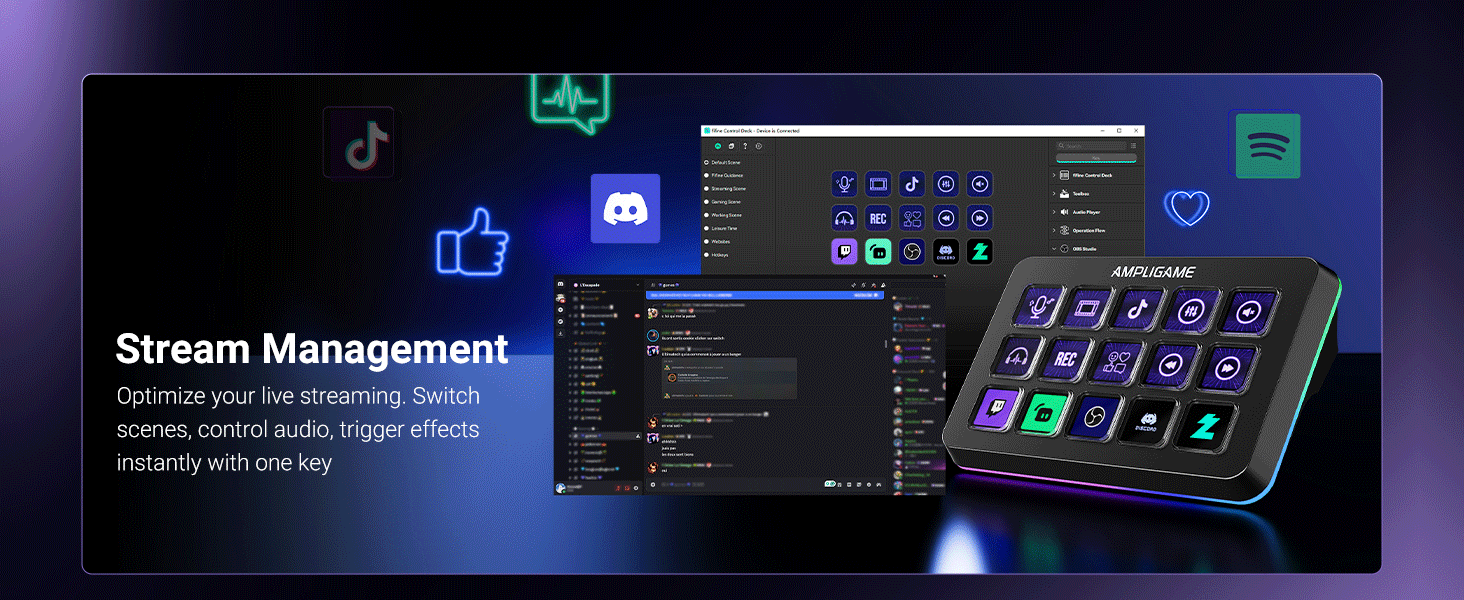

1 For Game
2 For Live Stream
3 For Productivity
Does Fifine D6 stream controller work with consoles?
No, this stream controller is designed to work with PCs and laptops. It is compatible with Windows and Mac OS.
Can D6 stream controller be programmed for specific software applications?
Yes, It has a wide range of software and plugins options, suitable for various scenarios such as music, games and live streaming. It works with OBS Studio, Streamlabs, Twitch, YouTube, and more.
Is it a wireless stream controller?
No, this stream controller is not wireless. It connects to your PC or laptop via a USB cable.
Does it have cutomizable RGB lighting?
Yes, It has a glowing RGB ring around the controller with a total of 9 different controllable and changeable modes.You can long press the button to turn on/off the RGB light.
Does D6 stream controller work without the software running?
No, the D6 stream controller requires the software to be installed and running for full functionality.
[Customizable LCD Macro Keys] Ampligame D6 stream controller features a total of 15 customizable macro keys , allowing you to create and assign different operations according to your live stream needs. Launch the software or application through a simple finger press, and switch your OBS scenes, control your audio levels, which is very easy and convenient to use.
[Wide Application Compatibility] This OBS stream controller for PC has a wide range of software, applications and plugins options whether in the store or download from the computer. They work with OBS Studio, Streamlabs, Twitch, YouTube and more in the Fifine D6 stream controller. This contoller for content creators lets you customize your setup effortlessly. You can also drag-and-drop, set up and download from the console’s store, with a very large number of plugins and icons to fill your streaming.
[Visual Operation Keypad] After setting and customizing your keys, you can see the application on the touchscreen of stream controller and press to control directly. No need to open plenty of windows/app interfaces on the PC screen one by one, the Fifine D6 macro keypad streamlines your workflow and improves the work efficiency. Let you know your demands having been satisfied with a visual feedback. (Tip: Please ensure both firmware and software are updated to the latest versions prior to initial use.)
[Vivid RGB Lighting] Brighten your gaming setup with customizable RGB effects on stream controller for gaming. There is a glowing RGB ring around the twitch stream controller, with a total of 9 different controllable and changeable modes. Matching the shortcut button’s look and gaming aura according to your personal preferences, dynamic RGB on video stream controller will give your viewers a more vivid game impression.
[Applied in Multi-Tasking Scenes] Whether you intend to use the PC media controller in gaming, live streaming, photography/graphics design, video editing, music creation or office work, this versatile streaming equipmentmakes multi-tasking easier. You can also create folders to generate different programs, and the individual scenes can be processed independently.
10 reviews for FIFINE AmpliGame Stream Controller with 15 Macro Keys, Streaming Keyboard with Trigger Actions in OBS/Twitch/YouTube/Streamlabs, Shortcut Buttons Keypad Works with Mac and PC-D6
Add a review
Related Products



$64.99
Allen Hopp Charles –
Reliable and well worth the price.
I have been loving this. I originally got it to have a few extra buttons for playing Star citizens because you never have enough extra for that game. Launching programs, being able to set macros extremely easy and using them in games, such a simple quality of life improvement has been a game changer, (pun intended). The tactile feel of pushing the button, having to push the button just enough that you’re not going to have any accidental button pushes, It’s been great. The build quality is good, it’s heavy enough that it doesn’t slide around on my desk, and being able to choose icons for my buttons has made looking at a glance to remember the macro I’m hitting awesome! With the ability to add a next and previous screen buttons you can add layouts for different games, applications, or just an extra screen for more macros.The only con I can give, and to me personally, and it’s not a big one, is sometimes the buttons can have just a little wobble due to how much travel distance there is on a button push, but again for me it’s worth it to not have accidental button pushes, and once I learned to push the button straight down instead of being in too much of a hurry I don’t notice.I don’t normally take the time to leave a lot of reviews, but this has made more than a difference than I expected it to and well worth the price.
Brandon Stocker –
Game-Changer for Streaming and Productivity!
I’ve only had the FIFINE AmpliGame Gaming Controller (D6 White) for a few days, but I can already say it’s made a big impact on my setup. The design is super clean the white finish with RGB lighting looks great on my desk, and the build feels solid and high quality right out of the box.The 15 shortcut keys are really easy to set up and have been a huge help for my streaming workflow. In OBS, I’ve already programmed buttons for scene switches, muting, and triggering transitions, and it works flawlessly. Even in just a short time using it, I can tell how much smoother it makes my streams.What surprised me is how useful it is outside of streaming, too. I’ve been using it for quick actions like volume control, launching apps, and media playback, and it saves me from constantly reaching for my keyboard and mouse. The RGB backlighting is a nice touch as well it makes the keys easy to see in low light and adds personality to the setup.Even though I’ve only been using it a few days, I can already tell this controller is going to become a permanent part of my workflow. If you’re a streamer, content creator, or just want to simplify daily tasks, this is a fantastic tool. Highly recommend!
R. Lee –
This thing is pretty amazing!!
I’m not a streamer, but this thing is very useful to gamers as well. This can basically be a PC button box with endless pages. You can configure each button to keyboard keys or mouse buttons and can make it do macros with keys and mouse clicks together! I have two old school button boxes for my racing/flying rig. This little thing just replaced them both and more. You can configure this thing and have a dedicated page (or pages) for each of your games. This is especially good for simulation games with many controls. I can setup a custom profile for a game like Star Citizen and have page after page of controls that you can just cycle through.The deck is also beautiful with vibrant little screens that can take text or icons. It has weight and feels really well made. It’s really pretty slick. At $60 it is a steal with standard button boxes now running around $100.My only complaint (but I just couldn’t remove a star for it) is the lack of angle adjustability. I had to buy a separate universal stand to get it at the angle I want.
Carol L. Mccawley –
Good product that does what you expect
Obviously a lower cost competitor to the Elgato stream deck. But for much less cost.You get just that. A lower cost product.It works well enough for light daily use, An occasional press here, and there.But if you plan to use this for continuations heavy application use, I’d suggest getting the ElgatoNot to bash this product, I have it, I use it. But it does have some drawbacks that come into play with heavy use.1. On boot the icons may not load,2. The buttons are clunky, and feel like there is something catching. There is a double click that they do, like someone spilled cola in is a week ago and it left a sticky substance inside.3. After pressing a button to change screens, there is a delay.4. Pretty sure that nothing is stored on the device at all. Speed is dependent on USB and software.The software works pretty good, takes a while but has a lot of options.Light to moderate use like myself? I’ts a great alternative to ElgatoHeavy dedicated application use? Buy the real one buy Elgato.Again, not to bash Fifine, it’s good and I love mine. Just buy what is best for your use case.
kappe –
recent cutest gadget
I often listen to music while gaming and this is a great way to change or pause my music instead of alt tabbing. The response time is almost instant and I haven’t had any issues.Setting up the macros and icons in the software was quite easy as well. You don’t have to be tech savvy, but it does come with a manual that gives instructions if you’re unsure of where to start.Only thing I will mention is that having an extra stand or different height options would be nice. Otherwise, it gets the job done and is a lot more budget friendly than others 🙂
philip –
Buttons are a little cheap feeling and the software is basic but does the job. Next time I would pay the extra for other brands
rakboss –
ممتاز
خالد سسروي –
هاذا من الاشياء الي تقول ماتحتاجها وتتفاجئ بعد استخدامه بندم وين عن الشي ذا من زمان يختصر وقت و يريحك
Brandon –
Es un cambio de dia y noche, muy util y muy bonito, recomendadisimo, muchos atajos y conjuntos de cosas que puedes ahcer con un solo boton
Mohamed Alzaabi –
Perfect