

USB C Docking Station Dual HDMI Monitor, Laptop Docking Station 3 Monitors, 2 * 4K HDMI+1080p VGA+100W PD+Ethernet+3 USBC 10Gbps+SD/TF+Audio Adapter, USB C Hub for Dell/Lenovo/HP/ThinkPad
$39.99




Price: $39.99
(as of Mar 24, 2026 00:47:56 UTC – Details)
From the brand

USB HUB
SSD Enclosure
NEW PRODUCTS

ACASIS develop and market a wide range of computer accessories & peripherals, including SSD Enclosues, USB Hubs, USB Docking Station, Capture Card and more. To make top products, we have established a professional team including top designer, top engineer and professional after-sales team.
Our vision is to bring a better using experience for digital products users. Keep working to supply a wide range of well-designed, superior quality products.


Laptop Docking Station Dual Monitor: This 14-in-1 usb c hub easily expands your laptop into a 14-port workstation, with 2 4K HDMI, 1080P VGA, 3*10Gbps USB C 3.1, 10Gbps USB A 3.1, 2xUSB 2.0, SD/TF card reader, 1Gbps Ethernet,3.5mm audio and microphone, and PD 100W charging. Computers which only support Single DP Alt Mode Output DO NOT SUPPORT MST
24 Month Warranty: You will get our worry-free 24-month warranty, and friendly customer service, whenever you need we will always here
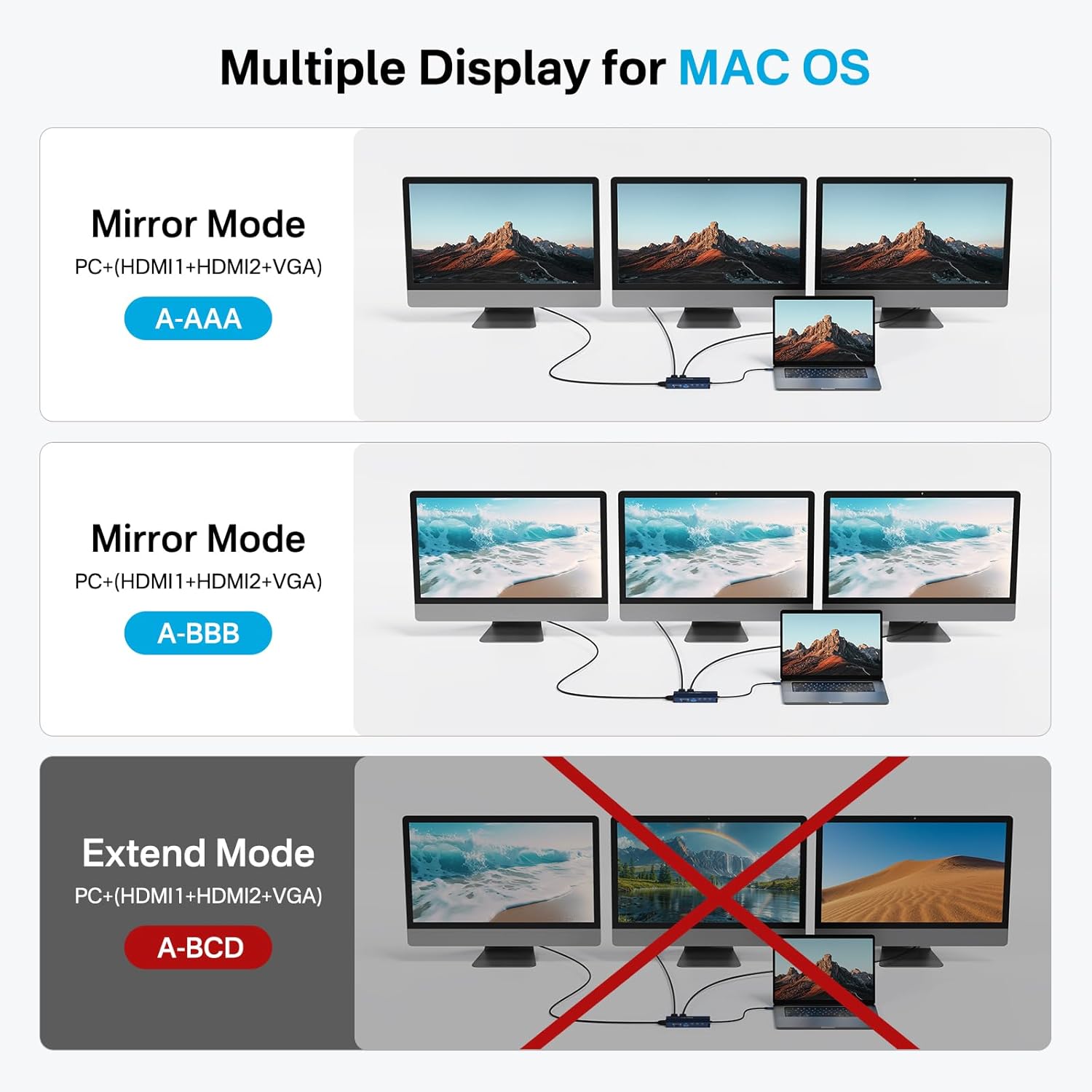
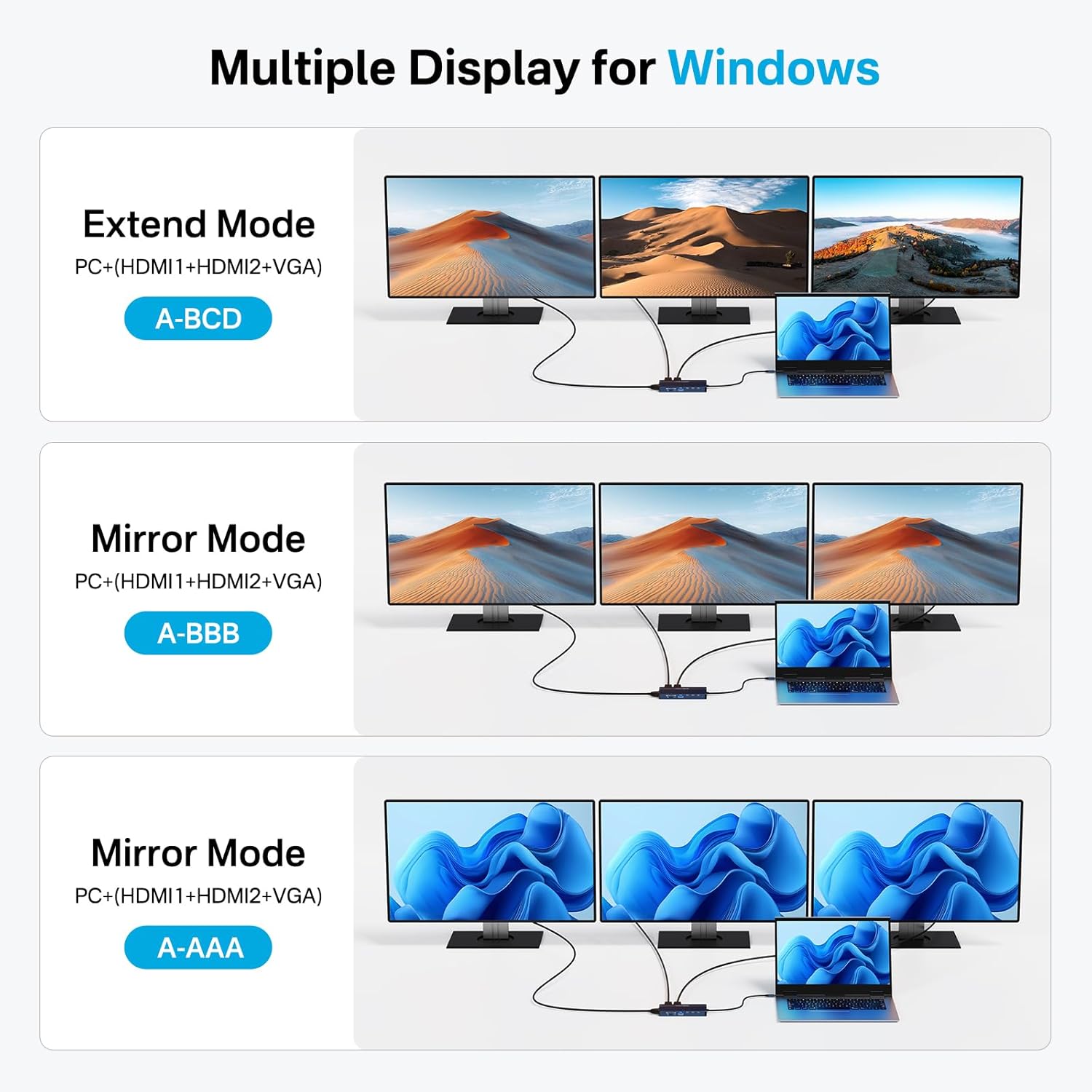
Triple Display Docking Station : This 14 in 1 USB C Docking Station Dual HDMI Monitor supports single 4K@60Hz display and triple 1080P 60Hz displays. ONLY Windows system support MST and SST(Mirror & Extend Mode). MacOS system DOES NOT support MST
10Gbps USB 3.1 Fast Data Transfer: The usb c docking station dual hdmi monitor adapter comes with 3*USB 3.1-C and USB 3.1-A ports, transfer your large files in seconds, suitable for video editor, Financial analysts and gamers
1 Gigabit Ethernet and 3.5mm Mic/Audio: Plug and Play, acasis usb c to ehternet adapter with 2 hdmi ports supports 1000 BASE-T Lan networks. Also, this usb c hub have a 3.5mm Mic/Audio port for you to put in your wired headset
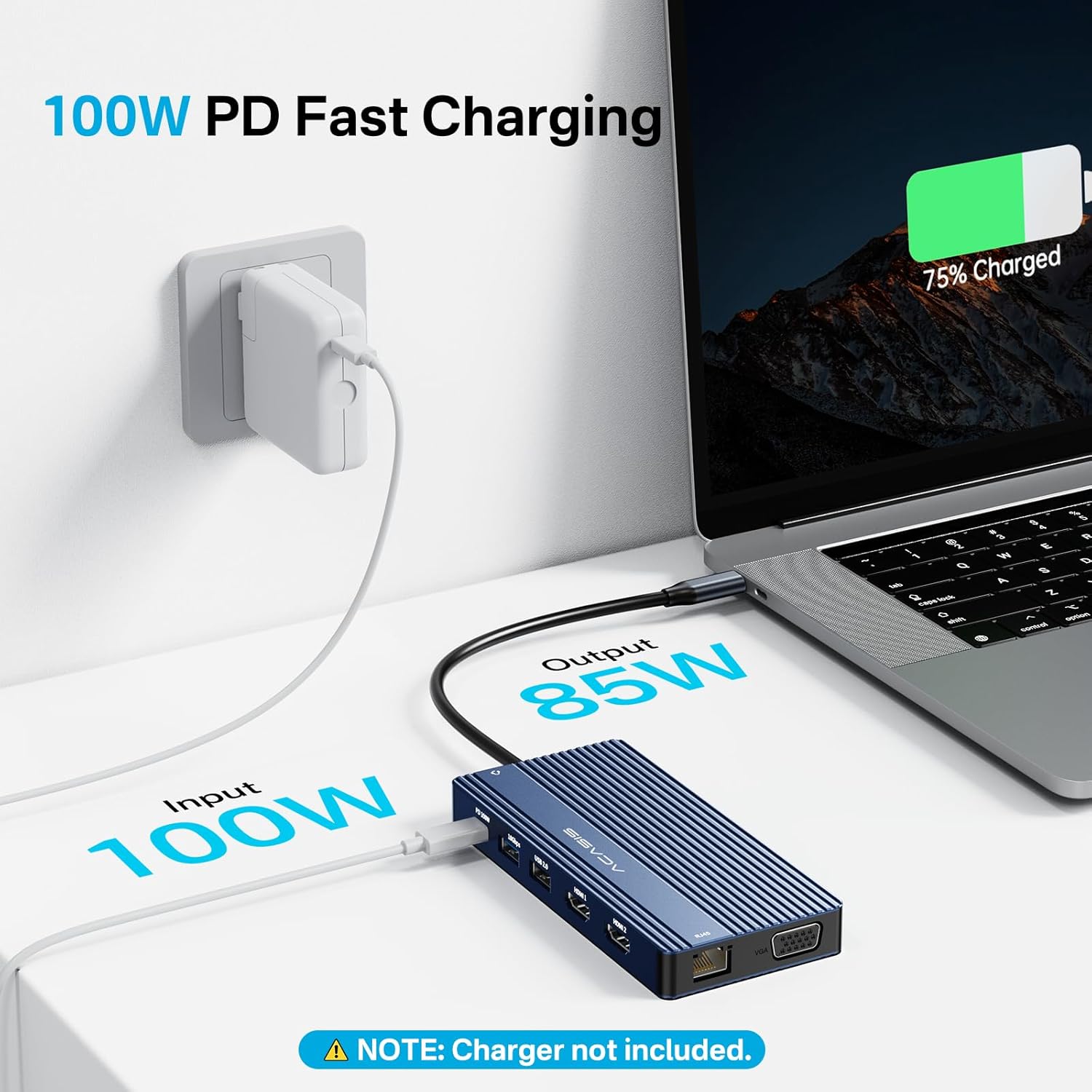
PD 100W Fast Charging:With 100W Charging USB C port, this usb c dock can charge your laptops/tablets/phone quickly when you using other ports.
Less Plastic, More Sustainability: At ACASIS, we’re committed to sustainability. Our compact packaging reduces waste, and also we’ve cut plastic use to lessen our environmental impact. As a socially responsible brand, we prioritize the planet’s future. Together, let’s build a greener world
13 reviews for USB C Docking Station Dual HDMI Monitor, Laptop Docking Station 3 Monitors, 2 * 4K HDMI+1080p VGA+100W PD+Ethernet+3 USBC 10Gbps+SD/TF+Audio Adapter, USB C Hub for Dell/Lenovo/HP/ThinkPad
Add a review
Related Products


$39.99
Al Tiki –
Great value, great quality product
Very nice quality dock. I bought this for my new laptop and it performs very well. It has all the ports that I was looking for. I’m very happy with this purchase. Great value for a great quality product. I would definitely buy again.
Austin Tillery –
A Game Changer for Multi-Tasking and Productivity!
I recently bought the 14-in-1 USB-C Docking Station with dual HDMI support, and I’m really happy with it! Here’s why:1. Lots of PortsThis docking station has 14 ports, which is awesome. It includes:2 HDMI ports (for connecting 2 monitors)USB 3.0 and USB 2.0 portsEthernet port for fast wired internetSD card and TF card slotsAudio input/output and more!It’s perfect for connecting all my devices without needing to constantly plug and unplug.2. Dual HDMI & Triple DisplayThe best feature is the dual HDMI support. I can use two external monitors along with my laptop screen, creating a triple display setup. This has been fantastic for multitasking and productivity—everything works smoothly without any lag.3. Fast Charging & Data TransferThe USB 3.0 ports let me transfer data quickly, and the USB-C PD port charges my laptop while I use the docking station, so I don’t have to worry about running out of battery.4. Compact & StylishIt’s compact and looks great on my desk. It doesn’t take up too much space and is built to last.5. Easy to Set UpSetting it up was super easy—just plug it in, and everything worked right away. No software needed!Final ThoughtsIf you need a way to connect multiple monitors, transfer data quickly, and charge your laptop all at once, this docking station is perfect. It’s been a huge help for my work and home office.Pros:Dual HDMI for two monitorsTriple display setup (laptop + 2 monitors)Lots of useful portsEasy setup, no software neededCons:USB-C charging may not work with all devices – It’s important to ensure your laptop or device supports USB-C PD for charging; otherwise, it might not charge through the docking station.
Natalia –
Great Product
Works like a champ. Solved all my problems when it came to connectivity to my laptop and how many cables I have.
H Noelle –
The Docking Station That Saved My Sanity (and My Desk)
**🌟🌟🌟🌟🌟 5/5 – The Docking Station That Saved My Sanity (and My Desk)**Let me just start by saying: the **ACASIS Direct US docking station** didn’t walk into my life… it *slid* in like a smooth operator with 12 ports and a dream. I was once a mere mortal, tangled in a jungle of cords, crying into my coffee as I tried to plug a USB into the HDMI slot for the 3rd time. But now? I’m basically Tony Stark, minus the suit (and the billions).I hooked this baby up to my laptop, connected two giant monitors, a keyboard, mouse, webcam, and even a portable fan (yes, I sweat under pressure). Everything worked **instantly**—no smoke, no sparks, and best of all, no drivers from 2006 trying to install themselves.**Pros:*** **Plug and play** like it’s 1999 and you’ve got a Game Boy.* Enough ports to make your IT guy cry tears of joy.* Sleek enough that it doesn’t scream “I’m a docking station,” but more like “I’m the command center now.”* Doesn’t get hot enough to fry eggs on. (Looking at you, previous docking station…)**Cons:*** My coworkers now think I’m too powerful. One even called me “Captain Productivity.”* The docking station hasn’t done my taxes yet. But I’m patient.If you’re looking for a way to connect all your tech without selling your soul or sacrificing your desk space, **get this docking station.** It’s the best third wheel your laptop will ever have.
Alex T. –
I like it but i’m not sure if all 3 usb c ports are 10gbps
I’m happy with this docking station overall. The design and features are good. However, I’ve encountered data transfer issue with one of the front USB C ports. Two ports perform as expected, but the third is noticeably slower. While this is a bit of a drawback, it’s not a deal-breaker, and I will continue using it in my main system
Lisa T –
HDMI ports don’t work!
Ordered this docking station long before I would try to use it. To my surprise the connection cord from the device is a type C and my computer did not have a Type C port, got that fixed with an adaptor plug. However, neither of the 2 HDMI ports worked for my monitor, so please be aware! I was told by a computer help center that most HDMI ports on docking stations do not work…………. SO DISSAPOINTING!
Jill –
Space saving
Works great. Smaller than the one I had and space saving
Robert Dixon –
USB C docking Station poor quality
This usb c docking station is poor value for money. It damaged one of my Hard Drive 💾 costing hundreds of dollars recover files. This is due the hardware not able to handle multiple devices specifically two or more Hard Drive. Poor Speed, inferior Quality hardware,
Sistemista –
Ok
Sheila –
Fonctionne avec 3 écrans! Ce produit répond à mes besoins!! Je suis très content. Et à très bon prix
Josetxu –
Me esperaba un aparato más grande, pero es más pequeño de lo que parece en las fotos.Muy útil y fácil de transportar si viajas a menudo
Franck Delaby –
Excellent produit pour utiliser Samsung Dex via S25 Ultra. Bien cordialement à vous.
Peter –
Als mir die ACASIS Docking Station zum Testen angeboten wurde, habe ich schlicht wegen der Vielfalt der Anschlüsse dankend zugesagt. Eine Docking Station mit so vielen Ports, inklusive VGA und LAN fand ich spannend.Das Gerät kommt in einer einfachen Schachtel und außer einer Bedienungsanleitung liegt nichts weiter bei. Das Gehäuse ist aus ordentlich maschiniertem Aluminium und die Auschnitte für die vielen Anschlüsse sind passgenau. Auch die RJ45 Buchse lässt sich hakelfrei benutzen, was leider nicht immer so ist. Die diversen UBS-Anschlüsse weisen keine Besonderheiten auf, der VGA-Buchse fehlen aus Platzgründen die Gewinde, um den Stecker zu verschrauben. Die Card-Slots für micro-SD und SD weisen auch keine Besonderheiten auf und lassen sich gut bedienen. Das fest installierte Uplink-Kabel mit USB-C Stecker am Ende ist sehr steif und knapp 30cm lang. Wenn das Gerät an einem Host steckt und bestromt ist, leuchtet vorne rechts eine winzige, blaue LED.Zu den Funktionen kann man außer den Daten wenig sagen. Das Dock besitzt tatsächlich nur eine USB-A Buchse, die nur USB2.0, sprich 480Mbit/s leistet. Diese kann man ja gezielt für Maus oder Tastatur benutzen, wo die Geschwindigkeit keine Rolle spielt. Alle anderen USB-Anschlüsse, sowohl USB-A, als auch USB-C, gehen mit schnellen 10 Gbit/s zu Werke. Das ist toll, da heutzutage viele externe SSDs leicht 1000 MB/s leisten und langsame Docks dann wirklich ein Ärgernis sind. Natürlich muss man bedenken, dass diese Geschwindigkeit unter den Ports aufgeteilt werden muss, weil auch der Uplink zum Rechner ‘nur’ 10 Gbit/s leistet. Die Downlink-Ports müssen sich die Geschwindigkeit also teilen. An der Stelle wäre nur ein TB Uplink eine Abhilfe, was aber die Sache ungemein verteuert und auch weniger kompatibel macht.Die HDMI Anschlüsse habe ich nicht auf alle ihre Fähigkeiten geprüft. Ich gehe aber davon aus, das die Herstellerangaben stimmen, wenn der Rechner die jeweiligen Formate unterstützt. Überhaupt habe ich das Dock nur mit 2 Macs getestet, einem Studio Max und einem MacBook Pro. Beide haben das Dock anstandlos akzeptiert und unterstützt, soweit es eben mit MacOS verträglich war. Auch der Audioanschluss an der Stirnseite wird sofort erkannt und kann benutzt werden. Am spannendsten fand ich den VGA-Ausgang, da ich tatsächlich noch einen alten VGA-Monitor besitze. Das Besondere an dem ist sein fast quadratisches Seitenverhältnis, was für ganz spezielle Anwendung genau passend ist. Es ist gut eine Möglichkeit zu haben, diesen auch mit modernsten Rechnern ansteuern zu können.Mein Fazit: die ACASIS Docking Station ist nicht ganz billig, für die Vielzahl der gut funktionierenden Ports aber nicht zu teuer. Soviel Flexibilität muss man erst mal finden. Die Bauqualität ist sehr gut, einzig das Uplink-Kabel würde man sich etwas flexibler wünschen. Alles andere passt haargenau. Deshalb gebe ich der ACASIS Docking Station gerne 5 Sterne und eine 100%ige Kaufempfehlung.