
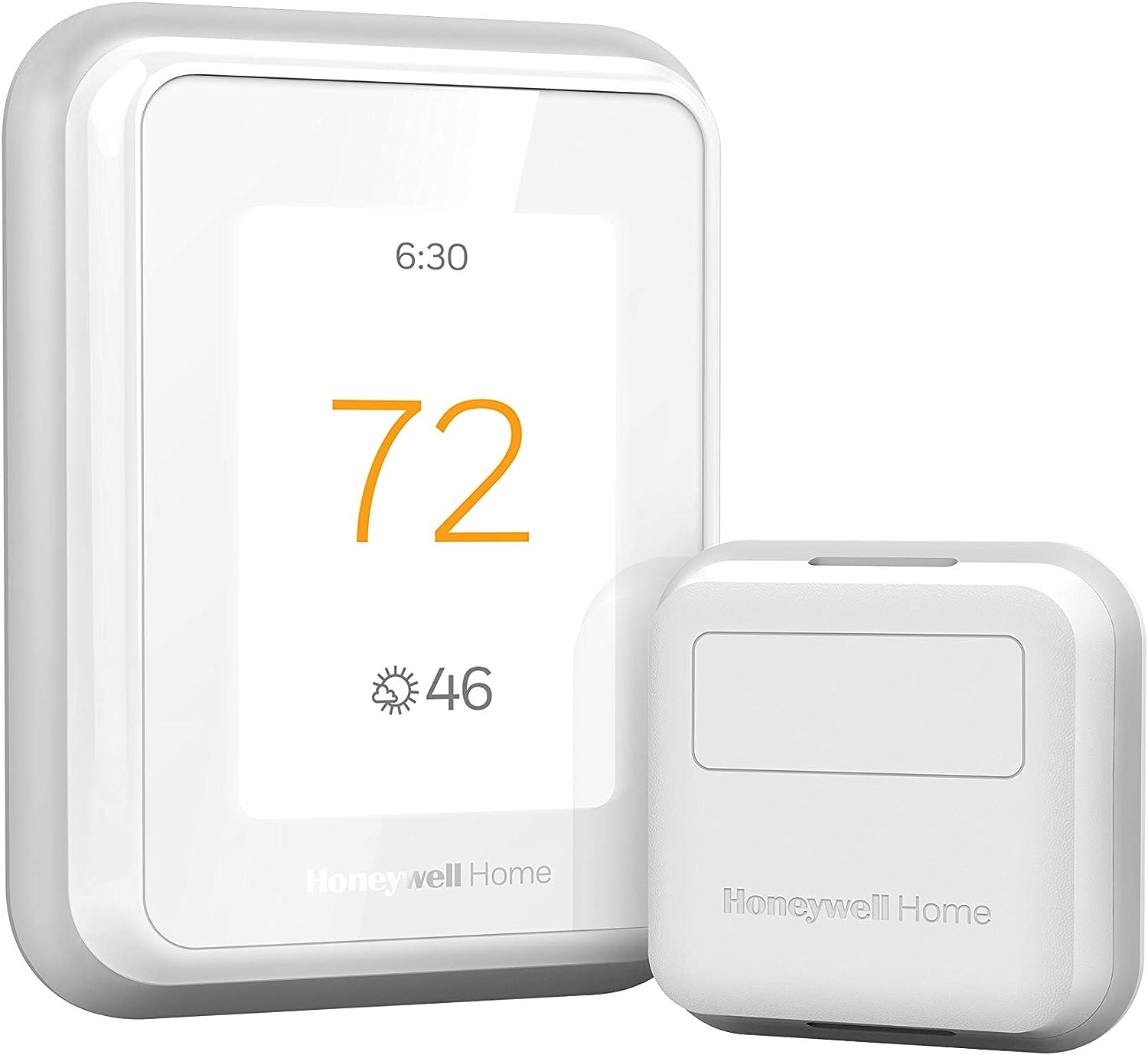
Honeywell Home T9 WiFi Smart Thermostat with 1 Smart Room Sensor, Touchscreen Display, White
$202.99


Price: $202.99
(as of Mar 27, 2026 08:37:22 UTC – Details)
The T9 Smart Thermostat works with Smart Room Sensors to help you adjust the temperature from anywhere and stay cozy in the rooms that matter. Place sensors where you want to see each room’s temperature and humidity. Use the multi-room display on the thermostat’s touchscreen — or in the Honeywell Home app — to focus on rooms based on occupancy or a specific schedule you choose. When focusing on multiple rooms, the T9 works toward creating an average temperature, balancing the needs across the whole home.
SAVE MONEY AND ENERGY. Adjust your ENERGY STAR certified thermostat from anywhere with your mobile device, or let your home automatically react to your schedule with Auto Home/Away Scheduling. Save even more by checking with your energy provider about available energy savings rebates to save on your purchase (rebate finder link above). Plus, eligible customers can enroll in their local Utility’s “DEMAND RESPONSE PROGRAM” which can reward you for allowing the utility to slightly adjust your AC or furnace temperature settings when there is high energy demand.
LIVE AND SLEEP SMARTER. Choose the temperature in a specific room, like the bedroom, to be exactly what you want it to be, to help get a better night’s sleep. Or let the Smart Room Sensors automatically detect which rooms people are in and focus comfort where it matters automatically.
AMAZING SENSOR RANGE. The battery powered Smart Room Sensors utilize unique Honeywell Home technology to deliver an efficient signal up to 200 ft range. (Could be further depending on home construction.)
MULTI-ROOM FOCUS. Don’t be forced to choose one room over another, the T9 Smart Thermostat can handle multiple rooms to focus on (requires sensors).
CONTROL IT YOUR WAY. Control the T9 using the Resideo app or through Amazon Alexa, Apple HomeKit, Google Assistant, and more.
COMPATIBLE WITH: Forced air (gas, oil or electric), hot water and steam, and heat pumps with electric backup. Does NOT work with electric baseboard heat (120-240V). C-Wire required.
DO IT YOURSELF SIMPLE INSTALL. With guided installation setup couldn’t be simpler. The included power adapter is an easy-to-install, low-voltage alternative to a C-wire, so the thermostat is compatible with most homes.
Before purchasing, check to see if this thermostat is compatible with your home and to determine if your home needs a C-wire power adapter.
Works with most heat/cool oil furnace systems. Will not work with heating only oil furnace systems unless a C-Wire is present.
7 reviews for Honeywell Home T9 WiFi Smart Thermostat with 1 Smart Room Sensor, Touchscreen Display, White
Add a review
Related Products


$202.99
Amazon Customer –
Great Thermostat, Easy Install especially with the Wall Plate Adapter
First the install is very easy if you are replacing an existing thermostat that has a C wire, a C wire adapter is included but I did not need that in my case. Secondly if you are replacing an existing thermostat, especially the traditional rectangular form factor, I HIGHLY RECOMMEND purchasing the THP2400A1080 wall plate adapter or the generic version which is much cheaper. It makes install of the T9 even easier.This thermostat has 3 holes you need to drill which are probably not in the location of the ones for your old thermostat. The wall adapter allows you to use the existing holes from your old thermostat then the UWP/mounting plate from the T9 (or any honeywell thermostat that uses the UWP) just clicks onto the adapter without new holes to drill. The cover plate from the wall adapter is then large enough to cover the area of your old thermostat.Now for a review of thermostat itself. My setup is a 2 story home with single stage forced air AC with a single stage gas furnace on a 2 zone system (upstairs and downstairs) so I bought 2 T9’s that replaced 2 old smart thermostat (old honeywell with basic wifi and online scheduling capability). The old thermostats worked fine but I upgraded to the T9 to hopefully mitigate unbalanced temps between rooms on the same floor as well as between the 2 floors. It absolutely worked as I had hoped. It has only been a few days but I can immediately tell the difference in temperature balance between the rooms and the floors in over 100 degree weather.How are these thermostats helping balance the air temp? First the room sensors allow you to prioritize which rooms are being used for temp readings at different times of day or based on activity. This can be done by either specifying a single room (or group of rooms to average the temperature) or by activity (also individual room or averaging multiple rooms). During the day I can prioritize the living spaces and at night the bedrooms for temp readings. This combined with the auto recirculation mode of the fan allows the fan to recirc air about 20 minutes every hour even when the heating or cooling isn’t actually running. Over the course of a day this really has helped balance the air between rooms and between the floors on my 2 zone system. Using the energy monitoring from my solar panel system I can already see a drop in energy usage as my AC has not had to run as much overall to make the occupied rooms comfortable.Also my thermostats are in stupid locations so the room sensors help with that. The UWP on the T9 is great as one of my thermostats is on the wall between the house and the garage which has a large hole for the thermostat wiring. The UWP for the T9 has a door that closes off that hole and the wiring before you attach the thermostat, so it is not reading any of that hot air coming from the wall. I confirmed this as my old thermostat use to read 2 degrees hotter than the rest of the hallway, verified with a separate thermometer, on a 100 degree day. The T9 now reads the same as the thermometerIn terms of why I chose the T9 over a Ecobee or a Nest, basically the T9 generally is cheaper. The T9 thermostat with a room sensor can be had for as little as $143. The other popular options cost more. While the additional features of the others may be worth it to some I simply would not use those features. For example, I am not going to talk to my thermostat. I am just gonna set the schedules and let the thermostat do its think and it still has integration to those systems if I choose to have that functionality later.Overall, great value smart thermostat that does what it needs to do. If I had one complaint is that this thermostat, and Honeywell thermostats in general don’t allow you to adjust the differential (the plus or minus above or below the setpoint the thermostat kicks on or off the air/heat) This seems to be set at a +/- of 1 degree and no way to change it. Some may prefer a differential of 1.5 to 2 degrees instead. This is somewhat mitigated by using multiple sensors to average the temperature but a differential setting adjustment would of made this thermostat almost perfect.
Goldndoodle –
AWESOME Thermostat – Difficult setup for ORBI Router users!
As part of my SmartThings Home Automation setup, I have used a NEST Thermostat for several years. Google recently announced they were ending support for 3rd Party Home Automation systems on NEST, so I replaced the NEST Thermostat with this Honeywell T9.Installation was very easy – I took a photo of the NEST wiring, moved wires to the new Honeywell connection block, attached the T9, turned power back on – up and running. (NOTE – this Thermostat requires a C wire to power it – I had a C wire connected to the NEST, so my install was VERY easy. If you do not have a C wire – Honeywell includes a converter block that needs to be installed INSIDE of your furnace – this may be daunting for some – so check to make sure you have a C wire, or are willing to perform the added work, or willing to pay an electrician to do the added work – before purchasing.)Once the T9 was powered on, the basic setup on the screen is also very easy – I didn’t even consult the owners manual, just followed the instructions on screen. Problems started when I went to connect the HONEYWELL HOME app to the T9. During the “handshake” procedure between the T9 and the app, I got an error message that said my router did not allow PEER TO PEER connections, and I needed to make some changes to my router to allow the PEER TO PEER handshake. I quickly did an online search looking for configuration changes to my Netgear ORBI router for Honeywell T9 Thermostat and found out I was not the only one having this issue. As the ORBI is a tri-band router, the T9 gets confused between the 2.4GHz and 5GHz bands and won’t work. The solution to the problem required accessing the root code via TELNET and Terminal (macOS) on my ORBI router to turn off the 5GHz radio for 10 minutes to complete the “handshake”. I carefully followed the directions, and finally got the Honeywell Home and T9 to connect.I started setting up schedules, connecting the T9 to SmartThings and Alexa. The T9 would not hold the WiFi connection. Another quick online search found that even after the “handshake” the T9 continues to be confused by the ORBI 5GHz frequency causing the WiFi connection to be lost every 10 minutes or so. The solution was again to use TELNET and Terminal to change the SSID name on the 2.4GHz band width. Then connect the T9 to that 2.4GHz SSID. Once I completed that – the T9 is rock solid. (As a side note – I apparently have lots of devices that only use 2.4GHz radios – BLINK cameras, Netatmo, Rachio, Samsung Smart Home appliances – I needed to go to all of those devices and reset WiFi to the new 2.4GHz SSID in order them to work. All of those devices I would classify as “flaky” previously for Internet connection – after they were connected to the 2.4GHz only SSID – they too now seem rock solid!)For those that are not familiar with TELNET and Terminal – and I was not until yesterday – this is like an old DOS system – you have to add line code that changes or deactivates features on the router to get the connection setup. Again, this may be daunting to some – check your router to see if you can turn off 5GHz band, or set up a separate 2.4GHz band SSID before purchasing this Thermostat. ORBI Users Note – there is no option for turning off 5GHz or setting up only a 2.4GHz SSID from the ORBI app or ORBI Router Login page – you will need to use TELNET and Terminal to access the ROOT code on the router to setup a separate 2.4GHz SSID.Other than that – the T9 is a great thermostat, looks really nice, easy to use, the Honeywell Home app looks exactly like the touch screen so that’s easy to use too, and the T9 connects easily to Alexa and SmartThings (set it up as a LYRIC from the Marketplace section of SmartThings Classic.)The only negative is the issues with my ORBI Router – which actually ended up being a positive because my other devices now seem to be more stable on the 2.4GHz only SSID.
Emad Ali –
great product!
Shabin rasheed –
In the catalogue it is mention that thermostat will work only on 24 V
Cynthia Garza –
Es bueno y fácil de usar, manejo todo desde la app en el celular
Bert –
This system only works with 24V control systems. IT is incompatible with live 240V controls as frequently used in the UK with timers for heating control.Otherwise it is a fine system, if only the sales info had been clear about it.
Joseph Nardi –
Super thermostat that has remote sensors for different rooms that allow priority temperature control.